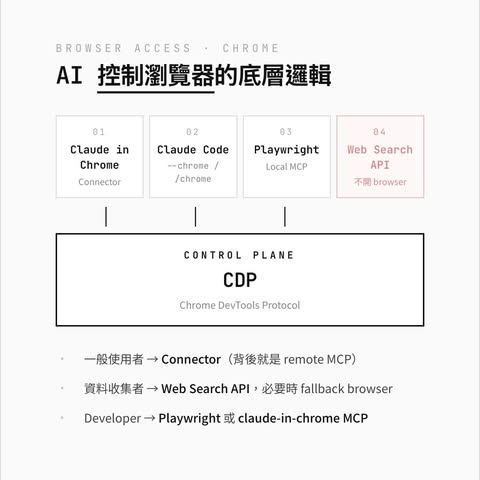
AI Agent 怎麼操作瀏覽器?我們常常叫 AI 去網路上幫我們收集資料,研究了一下,以 Chrome 為例,市面上的方案可以歸納成四種路線:
- Connector(Claude 網頁內有設定)
- Chrome Extension Relay(Claude Code 的 –chrome 走的路)
- Playwright(E2E 測試,我的愛物)
- Web Search API(不用開 browser,直接打 API,Agentic 愛用)
但拆下去發現前兩個其實共用同一個 remote MCP server(claude-in-chrome),所以實作上只有三種。
共同底層:Chrome DevTools Protocol
CDP(Chrome DevTools Protocol)本質上就是 Chrome 提供的低階控制介面——按 F12 開 DevTools 背後就是這套。多數 Chrome 自動化方案,最終會透過 CDP 或 Chromium automation layer(如 Playwright / Puppeteer)接觸瀏覽器能力。
某種程度上可以這樣類比:
LLM= CPUCDP= OS 的 syscallMCP= libc / POSIXstdio / WebSocket / cloud bridge= IPC bus
CDP 嚴格講不是 OS kernel syscall,但它是 Chrome 自己提供的 automation protocol——所有控 Chrome 的方案,最後都會跟它講話。第四個 Web Search 比較特別——它根本不用 browser,所以不在這個階層上,等下單獨講。
先釐清一個重要觀念:MCP 有兩種部署模式
提到 MCP,有兩種部署模式:
- Remote MCP — server 跑在公開 internet 上(HTTPS)。我們的 client 不直接連 server,是 Anthropic 後端代連。所有 Claude client(web、desktop、CLI、mobile)都用這條路徑。
- Local MCP — server 是跑在你電腦上的 stdio process(例如
npx起的 node script)。Claude Desktop 跟 Claude Code 才支援,Claude Web 不支援。
例如,claude-in-chrome 是 remote MCP,跑在 Anthropic cloud;Playwright MCP 是 local MCP,跑在你本機,所以通常在本機做 e2e test。
實作 1 — claude-in-chrome remote MCP
Anthropic 的 browser 整合都收斂在一個叫 claude-in-chrome 的 remote MCP server 上(目前還是 Beta 階段):
- Claude Web — Settings 裡開啟 Claude in Chrome (Beta) connector → 接
claude-in-chrome - Claude Desktop — Settings → Connectors → 開啟 Claude in Chrome → 接
claude-in-chrome - Claude Code —
–chromeflag //chrome→ 接claude-in-chrome
三個入口、同一個 remote MCP server、同一套 tools。「Connector」這個詞是給一般使用者看的 UI 標籤——工程上它就是一個 remote MCP server。Claude Code 官方文件直接寫「Run /mcp and select claude-in-chrome to see the full list of available browser tools」。
Anthropic 實際用 Chrome 的路徑是什麼樣?client 不是直接跟 extension 講話的,完整路徑是:
- 你的 client(web / desktop / CLI)透過 HTTPS 跟 Anthropic 後端對話
- Anthropic 後端代你呼叫
claude-in-chromeremote MCP server(也跑在 Anthropic cloud) - MCP server 透過 cloud bridge(可以連看看
bridge.claudeusercontent.com會出現 ws)以 WebSocket 連到你 Chrome 裡的 Claude in Chrome extension - extension 用 OAuth 帳號跟 cloud bridge 配對,然後用
chrome.debuggerAPI 拿 CDP handle,操作你的 Chrome tab
不用在本機裝任何 node server。MCP server 是跑在 Anthropic 的 cloud 上的,你只需要裝 Claude in Chrome extension 就好。也因為所有 traffic 都繞經 Anthropic 後端,理論上你的 client 跟 Chrome 不需要在同一台機器——跨網域、跨機器操作都可以。
超有趣,這端下指令,在異地端操作。
優點:
- 使用者體驗最好,pin 一下、點一下就用
- Claude 共用你 browser 的 login state — 已登入的 Gmail、Notion 直接讀
- 遇到登入頁或 CAPTCHA 會停下來請你手動處理
- 三個入口共用,不管你習慣哪個都能用
缺點:
- 偏封閉,主要服務 Claude 自家生態
- 第三方 agent 接不到這條路(要走自己的 extension relay)
OpenClaw(龍蝦)走純本機 loopback
對比一下 self-hosted 的方案就很清楚——OpenClaw 也是 extension relay 模式,但 transport 完全不同:
- OpenClaw 透過 loopback HTTP 打到本機 relay server(
127.0.0.1:18792) - relay 連到 OpenClaw 的 Chrome extension,extension 用
chrome.debugger拿 CDP。要先裝 OpenClaw Browser Relay extension(沒上架 Chrome Web Store,要 load unpacked) - click extension 工具列 icon 來 attach 你想控制的 tab — attach 是手動的,不會自動接管你的瀏覽器,小麻煩
完全沒有 cloud bridge——因為 OpenClaw 是 self-hosted,relay 本身是純本機 loopback。LLM 在哪裡,relay 就被推到哪裡。這是部署架構決定的——Claude in Chrome 因為服務雲端 LLM 所以 relay 在 cloud;OpenClaw 因為是 self-hosted 所以 relay 在 loopback。但是技術本身(extension + chrome.debugger)一模模一樣樣。
實作 2 — Playwright — E2E 測試的標配
Playwright MCP 是 local MCP——它在你本機起一個獨立的 Chromium process,跟你日常 browser 完全隔離。架構是:
- Claude Code 透過 MCP stdio 連到
npx起的本機 Playwright server(一個 node process) - server 透過 Playwright API 控制獨立的 browser instance
全部跑在本機。(Playwright 本身是 abstraction layer,對 Chromium 用 CDP,但對 Firefox / WebKit 是各家自己的 automation protocol。所以嚴格講它不完全等於直接打 CDP,但對 Chrome 來說底層就是 CDP。)
底下實際操作瀏覽器後,用 accessibility tree 而非 screenshot 給 LLM 看頁面。Playwright MCP 預設跑 Snapshot Mode,每次操作後輸出整棵頁面的 accessibility tree(YAML 格式)——每個元素標好 role(heading、textbox、checkbox)、name、跟一個 ref ID。LLM 直接用 ref ID 操作那個元素——不需要 vision model、不需要 pixel-level click coordinate、不會因為 button 動了 2px 就掛掉。因為不是在「看畫面」,而是在「讀結構」,所以穩定很多。
我自己偏好輕量方案
這邊講一下個人立場——我自己其實沒有很喜歡 MCP,因為它吃的 token 量太大,每個 MCP server 接上來都會把整套 tool schema 載進 context window,像 Playwright MCP 那種,schema 加上每次回傳的 accessibility tree,很容易就把 context 吃掉一大塊。
Microsoft 自己最近也在轉向——Playwright MCP 官方文件加了一段話,大意是「如果你是 coding agent,建議用 CLI + SKILLS 不要用 MCP,因為 MCP 會把大型 tool schema 跟冗長的 accessibility tree 載入 context window」。
Claude Code 為什麼用 deferred tools / tool_search 也是同一個道理——不是把所有 tool 一次塞進 context,而是用的時候才載入。本質上是把 tool schema 從「always-resident」改成「on-demand」,跟 OS 的 lazy loading / page-in 是一樣的概念。
所以如果是寫 agent,我會優先考慮 CLI + SKILLS 這種輕量方案;MCP 留給真的需要 persistent state 跟 rich introspection 的 agentic loop(像 self-healing tests、long-running autonomous workflows)。
但話說回來——即使 MCP 吃 token 吃到爆,Playwright 我還是用到爆 😂。因為 Playwright 的生態系對測試真的太友善了——accessibility tree 的 ref 定位、自動 wait、跨瀏覽器、screenshot/video 錄影、CI 整合、debug tooling……這些東西累積了好幾年,整個工具鏈成熟到一個地步。
寫 E2E 測試的時候,token 成本 vs. 開發效率,效率永遠贏。
實作 3 — Web Search API
直接打搜尋 API 拿結果,完全跳過 browser。所有付費 LLM 訂閱都內建了:
- Claude
- ChatGPT
- Gemini
- Perplexity
你叫 Claude「上網查一下」,走的就是這條。如果不滿意內建的,也可以自己買 API token:
- Perplexity Search API — 我自己超愛用這個,CP 值很高
- Brave Search API
- Tavily
- Exa(聽說 semantic search 強,有人用過嗎?)
OpenClaw 那種 self-hosted agent 最大的彈性就在這——search provider 你可以自己選自己接。如果連 API token 都不想花錢,還有一招——用 coding agent 的 non-interactive mode / headless mode,把內建 web search 當免費的搜尋引擎用。
Web Search 有一個致命缺點:SSR / 動態載入抓不到。Web Search 拿到的是 search engine 已經 index 過的版本,所以如果遇到:
- SSR(Server-Side Rendering)— 內容在 server 端組好,search engine 大致拿得到
- CSR(Client-Side Rendering)— 內容靠 JS 在 browser 才塞進 DOM,search engine 拿到的是空殼
- 需要登入的內容 — 看不到
- 互動式頁面 — 要點按鈕才出現的內容也沒辦法
- 新內容 — 還沒被 index 的拿不到
這時候就一定要退回去 Playwright 或 claude-in-chrome MCP,真的把 browser 開起來,等 JS 跑完再讀。
Developer 該選哪個?
按使用情境收斂:
- E2E 測試 → Playwright,沒得選
- testing 場景需要乾淨的隔離環境、需要 deterministic、需要 CI 上能跑 — Playwright 全部都有
- 讀已登入的前端資料 →
claude-in-chromeMCP(不管你是用 web、desktop、還是 CLI) - 抓沒開放 API 的服務 → 同樣是
claude-in-chromeMCP 或 Playwright - 一般資料收集 → Web Search API 為主,必要時 fallback browser
大部分情況 Web Search 夠用,又快又便宜。只有遇到 SSR / 登入 / 動態內容才需要動 browser,之前幫我媽從蝦皮抄訂單清單——蝦皮沒開 API,此外還要登入,所以 Web Search 完全廢掉,最後是用 Claude Code —chrome 讓 AI 慢慢操作。
AI 操縱瀏覽器之方式的選用指南
我是按身份來想:
- 一般使用者 → Claude in Chrome (Beta) connector(Claude 網頁設定裡點一下,背後就是 remote MCP)
- 資料收集者 → Web Search API + 必要時 fallback browser
- Developer 寫測試 → Playwright
- Developer 抓已登入資料 →
claude-in-chromeMCP - 抓沒開 API 的服務 →
claude-in-chromeMCP 或 Playwright
寫完這篇我自己最大的收穫是:根據你的任務,讓 AI 選用最適合的操作方式。E2E 測試就用 Playwright;想讓 AI 幫你跑網頁任務就用 claude-in-chrome MCP;單純查資料就用 Web Search API。
底層其實都在做同一件事——讓 LLM 跟 browser control plane 溝通,差別只在中間那層 wrapper——cloud bridge、stdio、WebSocket、loopback、MCP……每種 wrapper 對應的就是不同的使用情境。想清楚要解決什麼問題,Browser Use 的途徑自然就跟著確定了。